![Leadinfo_logo_RGB_Witte_tekst-3.png]](https://help.leadinfo.com/hs-fs/hubfs/Leadinfo_logo_RGB_Witte_tekst-3.png?width=135&height=28&name=Leadinfo_logo_RGB_Witte_tekst-3.png)
If there are multiple trackers active in your Leadinfo account, you can delete a tracker from a specific domain in the portal by following the instructions below:
Step 1: Go to the "Settings" tab in the Leadinfo portal, then select the relevant domain, and select "Delete tracker"
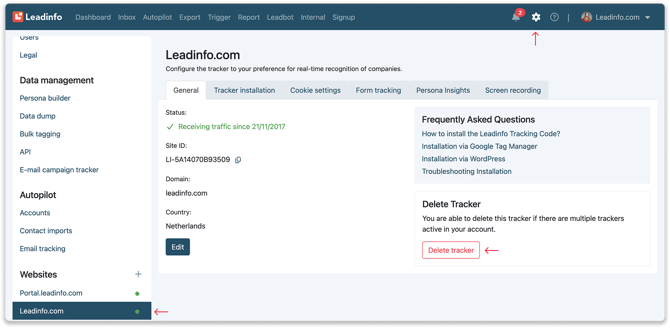
Step 2: Before the tracker is removed, you will receive a pop-up, asking you to confirm your choices, and advising that if the tracker is removed, all data linked to this tracker will be deleted.
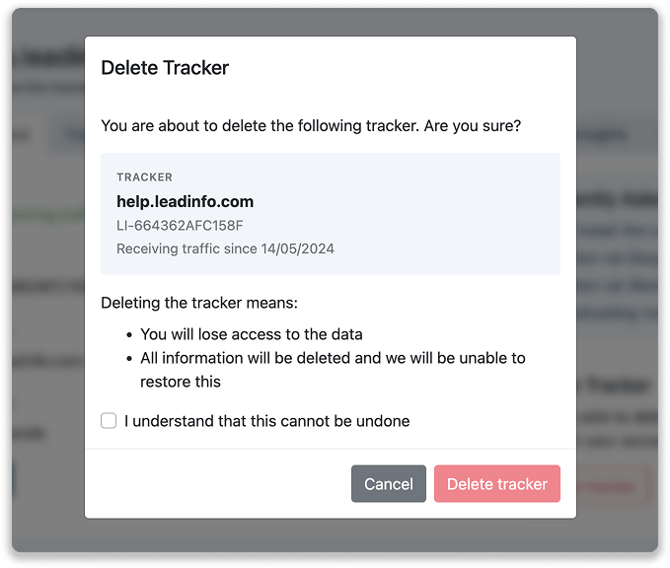
If you confirm your choice, the tracker will be removed from that specific domain.
Good to know: Simply removing the tracking code from your website does not mean the domain is removed or that your subscription is canceled. Your account will remain active until we receive an official cancellation request. If you wish to cancel your account, please ensure you contact us to complete the process properly.