![Leadinfo_logo_RGB_Witte_tekst-3.png]](https://help.leadinfo.com/hs-fs/hubfs/Leadinfo_logo_RGB_Witte_tekst-3.png?width=135&height=28&name=Leadinfo_logo_RGB_Witte_tekst-3.png)
Gain access to valuable Leadinfo data within your CRM system. You can easily set up the n8n integration within your Leadinfo account. Once you've set up the integration you can share data from Leadinfo to n8n.
In this article, we'll discuss:
- Why you should connect n8n to Leadinfo
- How to set up the integration
- How to automatically send leads to n8n
- How to manually send leads to n8n
- Data & field mapping
Why connect n8n to Leadinfo
Before you set up the integration, let's dive deeper into the benefits of connecting n8n to Leadinfo. First and foremost, with the integration you can:
🔗 Connect Leadinfo to any system supported inside n8n
💻 Create or update records in external tools
🆕 Add companies to automation flows for sales or marketing
✅ Enrich leads with additional data sources
This allows you to integrate the information from Leadinfo into your current sales flow.
How do I connect n8n to Leadinfo?
Step 1:
- Create a new workflow in n8n.
- Add a Webhook node.
- Configure the webhook method to POST.
- Copy the generated webhook URL.
This URL will act as the endpoint where Leadinfo sends company data.
Step 2:
In Leadinfo:
- Navigate to Settings → Integrations → n8n.
- Paste the webhook URL generated in n8n.
- Save the configuration.
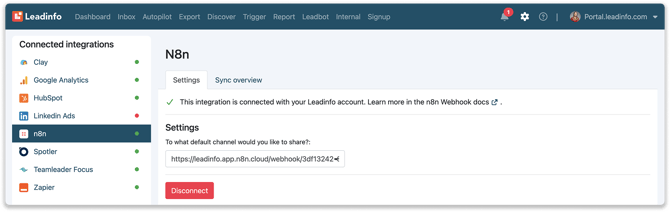
The integration is now active and ready to receive data.
How do I automatically send/connect leads to n8n?
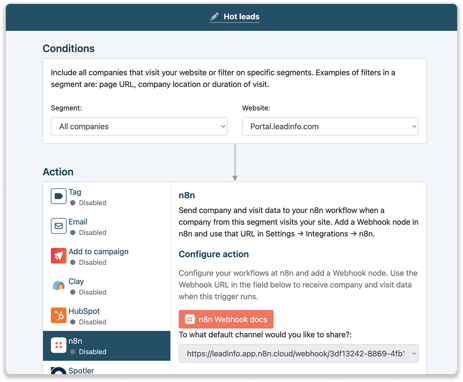
- Navigate to Triggers.
- Define the trigger rules.
- Add Push to n8n as the trigger action.
- Enable the trigger.
Whenever the trigger conditions are met, Leadinfo will automatically send the company data to the configured webhook.
How do I Manually connect leads from Leadinfo to n8n?
Step 1: First go to the company profile you want to connect.
Step 2: Click on the button "Actions" in the right corner, then select "Share on n8n".
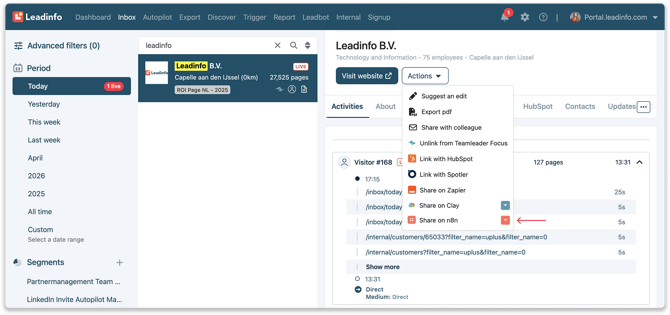
Step 3: Confirm the selection.
The company data is immediately sent to the configured webhook.
Data & Field mapping
When a webhook is triggered, Leadinfo sends all available company and visit data to n8n.
There is no field mapping configuration within Leadinfo. All available fields are sent automatically. Users can map or transform the data within their n8n workflow.
Examples of key data points included in the payload include:
- Company name
- Domain / website
- Email address
- Phone number
- Country
- City
- Industry classification
- Number of employees
- First website visit
- Last website visit
- Et cetera
Field selection and transformation should be handled within the n8n workflow itself.